
Set Up SSO with Shibboleth
Shelf supports SSO with Shibboleth over SAML 2.0. This guide covers the Shelf-specific configuration your identity team adds to your IdP, and how your workspace owner maps your groups to Shelf roles.
Who does what #
| Who | Task | Where |
|---|---|---|
| Your identity / IdP team | Trust Shelf's SP and release attributes | Shibboleth XML config (§1–§6) |
| Your Shelf contact | Register your IdP in Shelf, enable encryption | Handled by Shelf |
| Your workspace owner | Map released groups to Shelf roles | Shelf workspace settings, a GUI (§7) |
| Your users | Sign in | Your Shibboleth login page |
Prerequisites #
Read the general SSO prerequisites first, in particular:
- You have a non-SSO owner account ready to own the Shelf workspace.
- You've told your Shelf contact about any existing standard accounts on your SSO domain, so they can be converted to SSO (they keep their data, so nothing needs to be deleted). See Moving existing Shelf users to SSO.
- You've planned which of your groups/affiliations map to which Shelf role (Administrator, Manager, Self service, Base).
1. Service provider (SP) details #
Register these Shelf SP values in your metadata-providers.xml:
| Detail | Value |
|---|---|
| ACS URL | https://nmmqcuiasekdacmhwsxk.supabase.co/auth/v1/sso/saml/acs |
| Entity ID / Metadata URL | https://nmmqcuiasekdacmhwsxk.supabase.co/auth/v1/sso/saml/metadata |
| Relay State | https://app.shelf.nu/oauth/callback |
NOTE
Shelf's SP metadata is a live URL, so add it as an HTTPMetadataProvider (or download it once as a FilesystemMetadataProvider).
<!-- conf/metadata-providers.xml (excerpt) -->
<MetadataProvider id="ShelfSP" xsi:type="HTTPMetadataProvider"
metadataURL="https://nmmqcuiasekdacmhwsxk.supabase.co/auth/v1/sso/saml/metadata" />2. Configure a persistent NameID (required) #
Shelf identifies a returning user by the SAML NameID. Shibboleth's default is transient, which changes on every login — Shelf rejects it, and sign-in fails immediately after authentication. Configure a persistent NameID for the Shelf relying party (emailAddress is also accepted).
<!-- conf/saml-nameid.xml -->
<util:list id="shibboleth.saml2.NameIDFormatPrecedence">
    <value>urn:oasis:names:tc:SAML:2.0:nameid-format:persistent</value>
</util:list><!-- conf/relying-party.xml (excerpt) — pin persistent for the Shelf SP -->
<util:list id="shibboleth.RelyingPartyOverrides">
<bean parent="RelyingPartyByName"
c:relyingPartyIds="#{ {'https://nmmqcuiasekdacmhwsxk.supabase.co/auth/v1/sso/saml/metadata'} }">
<property name="profileConfigurations">
<list>
<bean parent="SAML2.SSO"
p:nameIDFormatPrecedence="#{ {'urn:oasis:names:tc:SAML:2.0:nameid-format:persistent'} }" />
</list>
</bean>
</bean>
</util:list>IMPORTANT
If you skip this, users reach the login screen but sign-in fails right afterward. If everything else checks out and login still fails at that point, this is almost always why.
3. Release the required attributes #
Add an AttributeFilterPolicy scoped to Shelf's entity ID, releasing mail, givenName, sn, and your chosen group attribute (see §6). Without a release policy the assertion is empty and sign-in fails with "no email".
<!-- conf/attribute-filter.xml (excerpt) — Shibboleth IdP v5 -->
<AttributeFilterPolicyGroup id="ShelfPolicy"
    xmlns="urn:mace:shibboleth:2.0:afp"
    xmlns:xsi="http://www.w3.org/2001/XMLSchema-instance"
    xsi:schemaLocation="urn:mace:shibboleth:2.0:afp http://shibboleth.net/schema/idp/shibboleth-afp.xsd">

  <AttributeFilterPolicy id="releaseToShelf">
    <PolicyRequirementRule xsi:type="Requester"
        value="https://nmmqcuiasekdacmhwsxk.supabase.co/auth/v1/sso/saml/metadata" />

    <AttributeRule attributeID="mail"><PermitValueRule xsi:type="ANY" /></AttributeRule>
    <AttributeRule attributeID="givenName"><PermitValueRule xsi:type="ANY" /></AttributeRule>
    <AttributeRule attributeID="sn"><PermitValueRule xsi:type="ANY" /></AttributeRule>
    <AttributeRule attributeID="isMemberOf"><PermitValueRule xsi:type="ANY" /></AttributeRule>
  </AttributeFilterPolicy>
</AttributeFilterPolicyGroup>NOTE
On v5, SAML encoding lives in the attribute registry (conf/attributes/) — mail, givenName, sn, eduPersonScopedAffiliation, and eduPersonEntitlement ship pre-registered. isMemberOf (eduMember schema) may need its own registry rule if your deployment doesn't already release it.
Friendly name or OID — either works #
attributeID in the filter must match whatever ID your resolver/registry actually assigns the attribute internally, and that isn't always the friendly name — depending on your deployment, an attribute can resolve only under its OID. If a rule with PermitValueRule ANY still releases nothing, switch attributeID to the OID form and retest:
| Attribute | Friendly name | OID |
|---|---|---|
mail | urn:oid:0.9.2342.19200300.100.1.3 | |
| First name | givenName | urn:oid:2.5.4.42 |
| Last name | sn | urn:oid:2.5.4.4 |
| Groups | isMemberOf | urn:oid:1.3.6.1.4.1.5923.1.5.1.1 |
Shelf accepts either form automatically for every attribute above — there's nothing to tell us and nothing to reconfigure on our side, whichever one your IdP releases.
4. Assertion encryption — automatic #
Shelf publishes an encryption certificate in its metadata and accepts encrypted assertions, so your IdP encrypts automatically (Shibboleth's default when the SP advertises an encryption key). Nothing to configure — assertions are encrypted end-to-end.
5. Send us your metadata #
Send your Shelf contact:
- Your IdP metadata — the metadata URL (e.g.
https://idp.your.edu/idp/shibboleth, or your federation metadata) or an exported XML file. - The domain your users sign in with.
- Which group strategy you chose (§6).
We register the provider and confirm once it's live — usually about 1 business day. Don't test sign-in until you hear back.
6. Choose a group strategy #
Shelf assigns roles from the group values you release. Pick whichever your institution already populates — all three work identically on the Shelf side; you only need one.
| Strategy | SAML Name (OID) | Example value |
|---|---|---|
isMemberOf (recommended) | urn:oid:1.3.6.1.4.1.5923.1.5.1.1 | cn=shelf-admins,ou=groups,dc=your,dc=edu or a Grouper path your:apps:shelf:admins |
eduPersonEntitlement | urn:oid:1.3.6.1.4.1.5923.1.1.1.7 | urn:mace:your.edu:shelf:admin |
eduPersonScopedAffiliation | urn:oid:1.3.6.1.4.1.5923.1.1.1.9 | staff@your.edu, faculty@your.edu |
isMemberOf— best when you can create dedicated Shelf groups in Grouper/LDAP. The most flexible.eduPersonEntitlement— application-specific entitlement URIs.eduPersonScopedAffiliation— coarse mapping by affiliation (e.g. allstaff→ one role). No new groups needed.
Whichever you pick, release it via the attribute-filter.xml policy in §3 (swap isMemberOf for your attribute id), and tell your Shelf contact so we point the mapping at the right OID.
7. Map your groups to Shelf roles #
Once your provider is registered, your workspace owner maps each group value to a Shelf role in workspace settings → SSO.
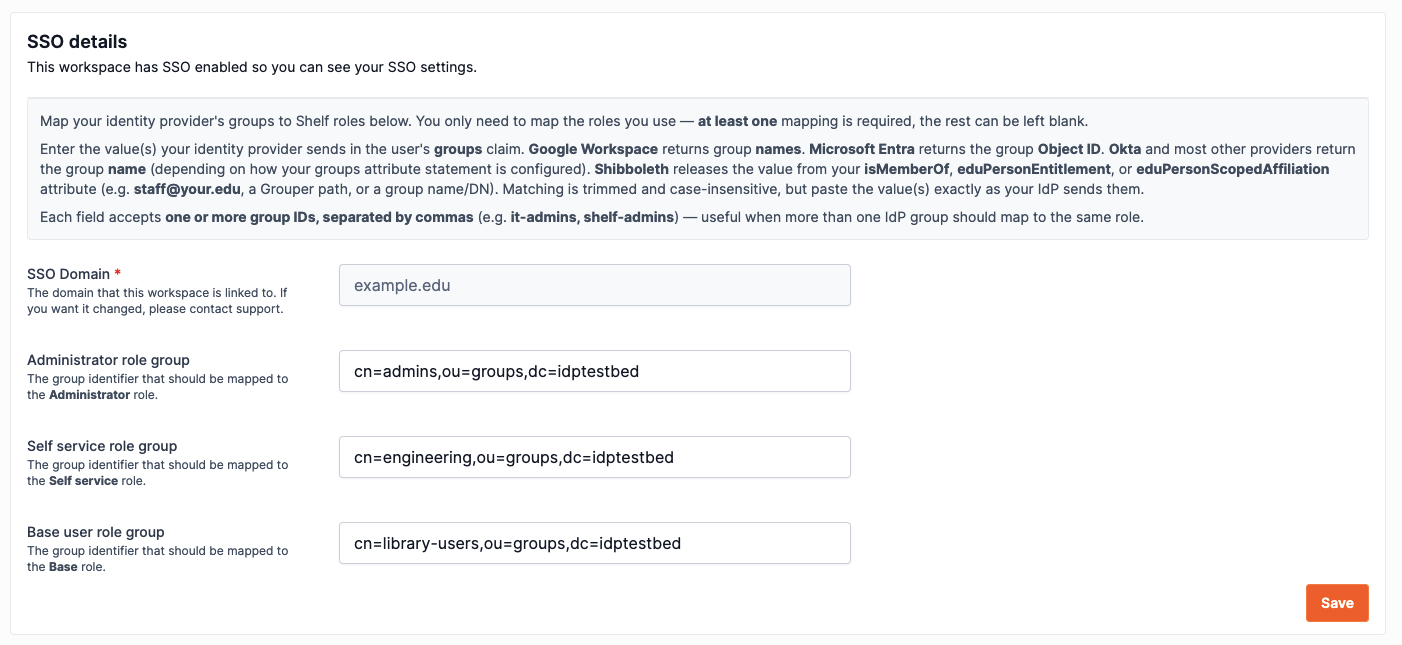
Enter the value your IdP releases next to each role you use:
| Shelf role | Paste the group value that should grant it |
|---|---|
| Administrator | e.g. cn=shelf-admins,ou=groups,dc=your,dc=edu |
| Manager | e.g. cn=shelf-managers,ou=groups,dc=your,dc=edu |
| Self service | e.g. cn=shelf-staff,ou=groups,dc=your,dc=edu |
| Base | e.g. cn=shelf-users,ou=groups,dc=your,dc=edu |
Rules to know:
- Paste the value exactly as your IdP releases it. If unsure, ask your identity team for a sample assertion (or check the IdP audit log) for the precise string.
- Multiple groups → one role: each field accepts several values, comma-separated (e.g. Grouper paths
your:apps:shelf:it-staff, your:apps:shelf:av-services) — anyone in any of them gets that role. Note: a value that itself contains commas (a full LDAP DN likecn=…,ou=…,dc=…) can only be used on its own, not comma-listed — to grant one role from several DN-shaped groups, release a comma-free identifier (a Grouper path or aneduPersonEntitlement) for them instead. - Matching is trimmed and case-insensitive — but a leading/trailing scope difference still counts as a mismatch, so copy the real value.
- Precedence is Administrator > Manager > Self service > Base. A user whose groups match more than one role gets the highest. A user still only ever holds one role per workspace.
- Users can be members of many groups — Shelf matches any mapped one regardless of its position in the list. You only need to map the roles you actually use, but at least one must be mapped.
8. Test single sign-on #
Go to /sso-login, enter your domain, and sign in as a test user:
- A user whose groups match a mapped role lands in the workspace with that role.
- A user with no matching group lands on the pending-assignment screen (expected) rather than being denied — it resolves as soon as an admin maps their group.
Moving existing Shelf users to SSO #
If people on your domain already have standard (email/password) Shelf accounts, they do not need to be deleted or recreated. Shelf converts them to SSO, keeping their data and workspace memberships. The first SSO sign-in after conversion lands the user in their existing account, with all their data and workspaces. The persistent NameID from §2 is all it needs. The one exception is a user who tried to sign in with SSO before their account was converted: their first SSO sign-in after conversion shows "Your account is now on single sign-on" and asks them to sign in with SSO once more. After that they sign in once, as usual. Convert accounts before announcing SSO to your team to avoid this extra step. Map your groups (§7) before the accounts are converted, because a converted user whose groups map to no role loses access to the workspace at their first SSO login (the workspace owner keeps their Owner role and access). See Existing standard accounts on your domain for the full rules.
Troubleshooting #
No email, or missing name/groups after a successful redirect back from Shibboleth. Almost always a missing or mis-scoped attribute-filter.xml policy — the resolver may have the value, but nothing is released until a filter policy permits it to Shelf's entity ID. Check §3 first.
One attribute (e.g. last name) still doesn't release, even with a permissive attribute-filter.xml rule for it. The rule's attributeID doesn't match the ID your resolver assigns that attribute internally — some deployments resolve a given attribute only under its OID, not its friendly name (or vice versa). Switch attributeID to the other form (table in §3) and retest; Shelf accepts either.
Login fails immediately after the Shibboleth screen, with no clear error. Your IdP is issuing a transient NameID (the default). It must be persistent (or emailAddress) for the Shelf relying party — see §2.
A user always lands on the pending-assignment screen even though you mapped their group. The string the IdP released doesn't match what's pasted in Shelf. Matching is case-insensitive and trimmed, but not fuzzy. Get a sample assertion for that user and paste the exact value.